Copyright 2026 Breichbilt LLC

Zapa Client Portals and TaxDome both give professional firms a secure client portal for files, e-signatures, and document requests. The short version: TaxDome is a full practice-management platform priced per seat, per year, billed upfront on a one-, two-, or three-year commitment ($83–$100 per user/month on an annual term), so your cost grows with your team. Zapa is one flat price — $140/month billed annually with unlimited team members — so firms with two or more staff usually pay less on Zapa. TaxDome runs your whole practice; Zapa does one job, and does it so clients of any age can actually use it.

Monthly cost on annual billing, prices verified September 2026. Zapa Professional is $140/month flat. TaxDome Pro is $1,000 per seat/year ($83.33 per user/month) and TaxDome Business is $1,200 per seat/year ($100 per user/month), each requiring a commitment term.
Honest math: a solo practitioner pays less on TaxDome. The math flips as soon as you hire your second person — and every person you add after that is free on Zapa. No per-seat fees, ever. Worth knowing: TaxDome's Essentials plan is solo-only, and adding a second user automatically moves the whole account to Pro at $1,000 per seat/year. Both products let your clients use the portal at no charge; the difference is what your own team costs you.
The monthly figures above are the fair comparison, but they aren't what leaves your bank account. TaxDome bills every seat upfront for the full term — installment plans only become available once the invoice tops $9,000.
TaxDome's published prices assume a one-, two-, or three-year commitment, paid upfront, and the price you see first on their pricing page is the three-year rate. Zapa is $140/month billed annually or $175 month-to-month — no multi-year contract to sign before you know whether your clients will use it.
A portal only saves you time if clients stop emailing attachments. Zapa is designed for the clients other portals frustrate — including the 80-year-old estate client who has never created a password.
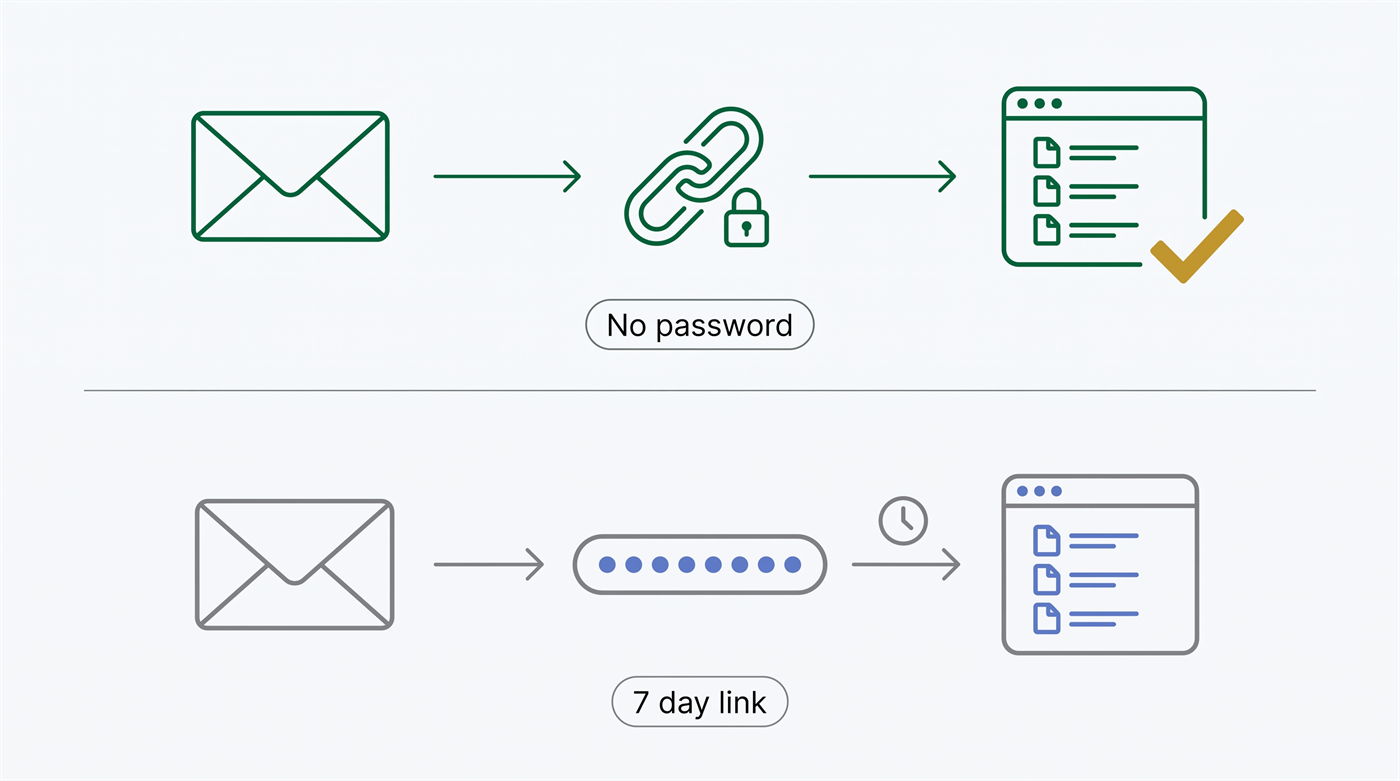
Clients open their portal from a secure link in their email. Nothing to create, forget, or reset. TaxDome can send an individual signature request or questionnaire as a no-login link that expires in seven days, but the portal itself — where the client's files and history live — needs an account and a password.
Clients photograph documents with their phone and the pages land in the right folder, properly named.
Zapa keeps nudging politely until the document arrives, so your staff doesn't have to.
On the Large Firm plan, video chat is built into the portal — present a document on screen and collect the signature live, together, instead of hoping an emailed request gets opened.
Some things aren't a tier upgrade away on TaxDome. Even on their top Business plan, only Zapa gives you:
Embed the portal directly in your own website — WordPress or any site — so clients upload and sign at yourfirm.com. TaxDome gives you two choices: send clients off to a TaxDome-hosted link, or point a whole domain at TaxDome so it opens instead of your site.
Built-in video chat with live present-and-sign, plus recorded video messages your clients can watch right in the portal (Large Firm plan). TaxDome has no native video — you book through Calendly and meet on Zoom, or paste a Loom link into the chat thread.
$140/month billed annually with unlimited team members, or $175 month-to-month with no commitment at all. Every TaxDome seat is an annual commitment paid upfront, and there is no true month-to-month plan — the $100/month seats are add-on seats for short-term staff on top of a yearly Pro subscription.
We'd rather you pick the right tool than regret the wrong one:
Considering more than these two? Nine client portals compared on cost at 1, 5 and 15 staff and on how clients sign in.
Tell us what you're using it for. If it's the whole practice, we'll say so — Zapa isn't a practice-management replacement. If the part that's failing is clients not uploading documents, that's the part we fix, and our team moves your existing files for you. Portal live the same afternoon.
TaxDome is priced per seat, per year, billed upfront. Essentials is $800 per year and is limited to a single user; Pro is $1,000 and Business is $1,200 per seat per year on a one-year term, dropping to $900 and $1,100 on a three-year commitment. The prices shown first on TaxDome's pricing page are the three-year rates.
For a solo practitioner, no — TaxDome Essentials is $800/year versus Zapa's $1,680. From two staff up, yes, and the gap widens with every hire: a 15-person firm pays about $1,250/month on TaxDome Pro versus $140/month flat on Zapa.
Only if you're using TaxDome primarily as a client portal. TaxDome is a full practice-management platform with CRM, invoicing, proposals, and workflow automation; Zapa is a client portal and doesn't do those things. Many firms keep their practice-management system and use Zapa for the client-facing document exchange.
No. Clients open their portal from a secure link in their email — nothing to install, no password to create or reset. TaxDome clients activate an account and choose a password to reach their portal, though a firm can send an individual signature request or questionnaire as a no-login link that expires after seven days.
No. Zapa is $140/month billed annually or $175 month-to-month. TaxDome sells one-, two-, and three-year terms, billed upfront.
Yes — full data migration service is included. Our team transfers your client files and folder structure so you don't rebuild anything by hand.
Not natively. TaxDome integrates with schedulers like Calendly and Acuity so clients can book time, and you can paste a Loom, Vimeo, or YouTube link into a chat thread — but the meeting itself happens on Zoom or Teams. On Zapa's Large Firm plan, video chat runs inside the portal, and you can present a document and capture the signature live on the call.
