
Header green dot shapeHeader green dot shape
Guide · Updated September 2026

The Client Portal Your Older Clients Can Actually Use

Zapa Client Portals is a secure client file-sharing portal built so that elderly and less-technical clients can use it without help. Clients sign in from a link in an email with no password to remember, nothing to download, and no account to create. They can photograph a document with a phone and send it, and Zapa names the file for them. It is used by law firms, accounting and tax practices, and fiduciary and estate practices whose clients are often in their seventies and eighties. Pricing is flat — $175/month for the Professional plan, or $140/month billed annually — with unlimited team members and unlimited clients, and clients never pay anything. Firms have moved over a million client files through Zapa portals.

The demo invites you into a portal as your client would see it. No credit card and nothing to install.

A woman in her late seventies at a sunlit kitchen table photographing a document with her phone, her client portal open on the laptop beside her

Why elderly clients abandon portals

Most portals are not hard for the firm. They are hard for the client, and the firm only finds out when the documents never arrive.

The failure almost always happens before the client ever sees a file. It is the account creation, the password rules, the verification code that arrives on a phone they do not have in front of them, the app-store download, the session that timed out while they looked for their reading glasses. A client who fails at that screen does not call support. They reply to the email with the attachment, or they drive the paperwork to your office, and your portal quietly becomes a line item nobody uses.

That is why “easy to use” is the wrong question. The question is whether a client can finish the task on the first attempt, alone, on whatever device is already in front of them.

Two paths to the same document. One of them ends in an email attachment.

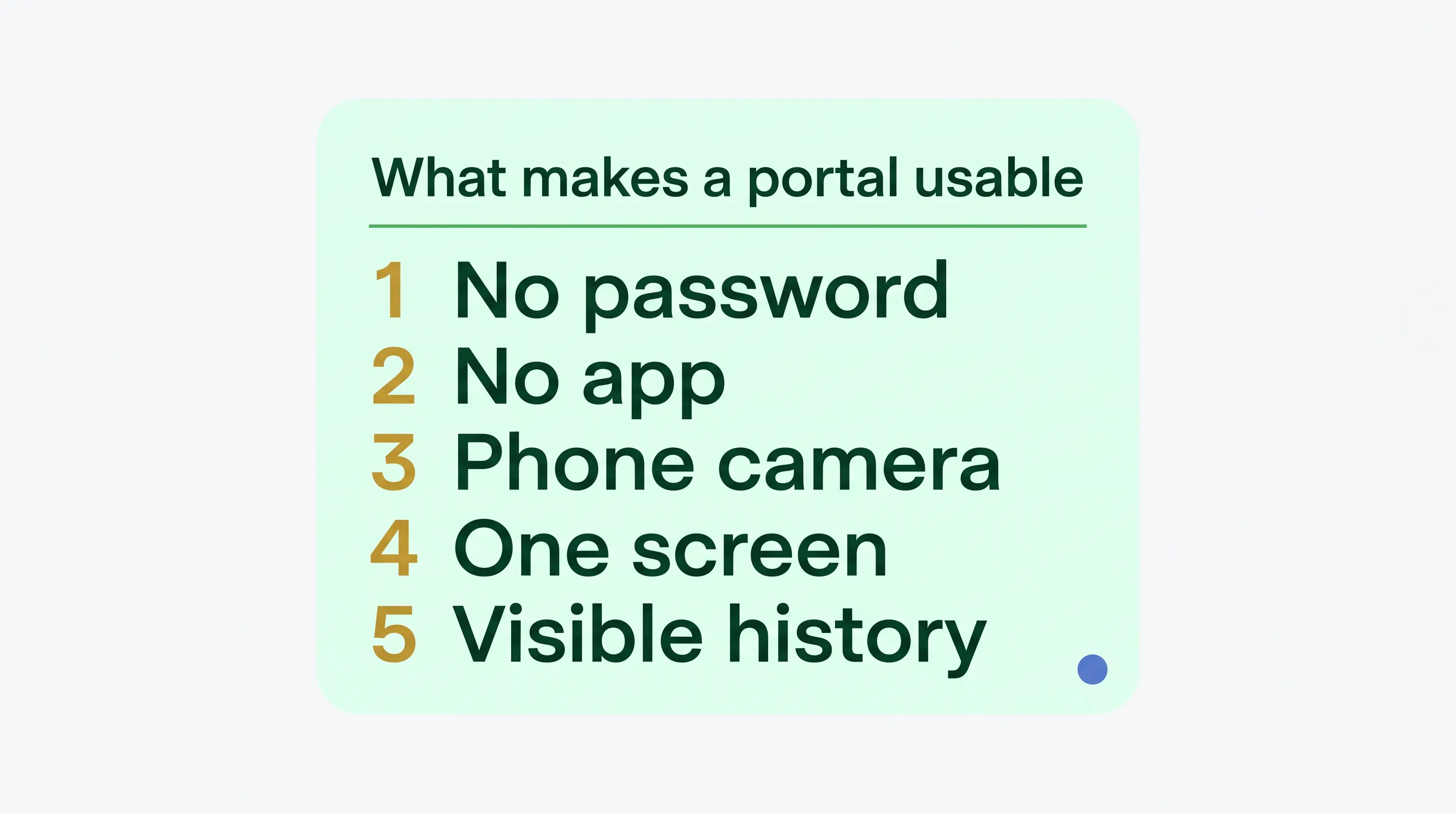
The five things that decide whether a portal works for an elderly client

  1. No password, and no account to create.

    A password is the single biggest point of failure. The portal should let a client in from a link in an email they already received, and it should still work if they open that email tomorrow on a different device.

  2. No app, and no app store.

    Anything that requires an app-store account and a download loses a share of clients permanently. The portal should open in the browser that is already on the device.

  3. A phone camera counts as a scanner.

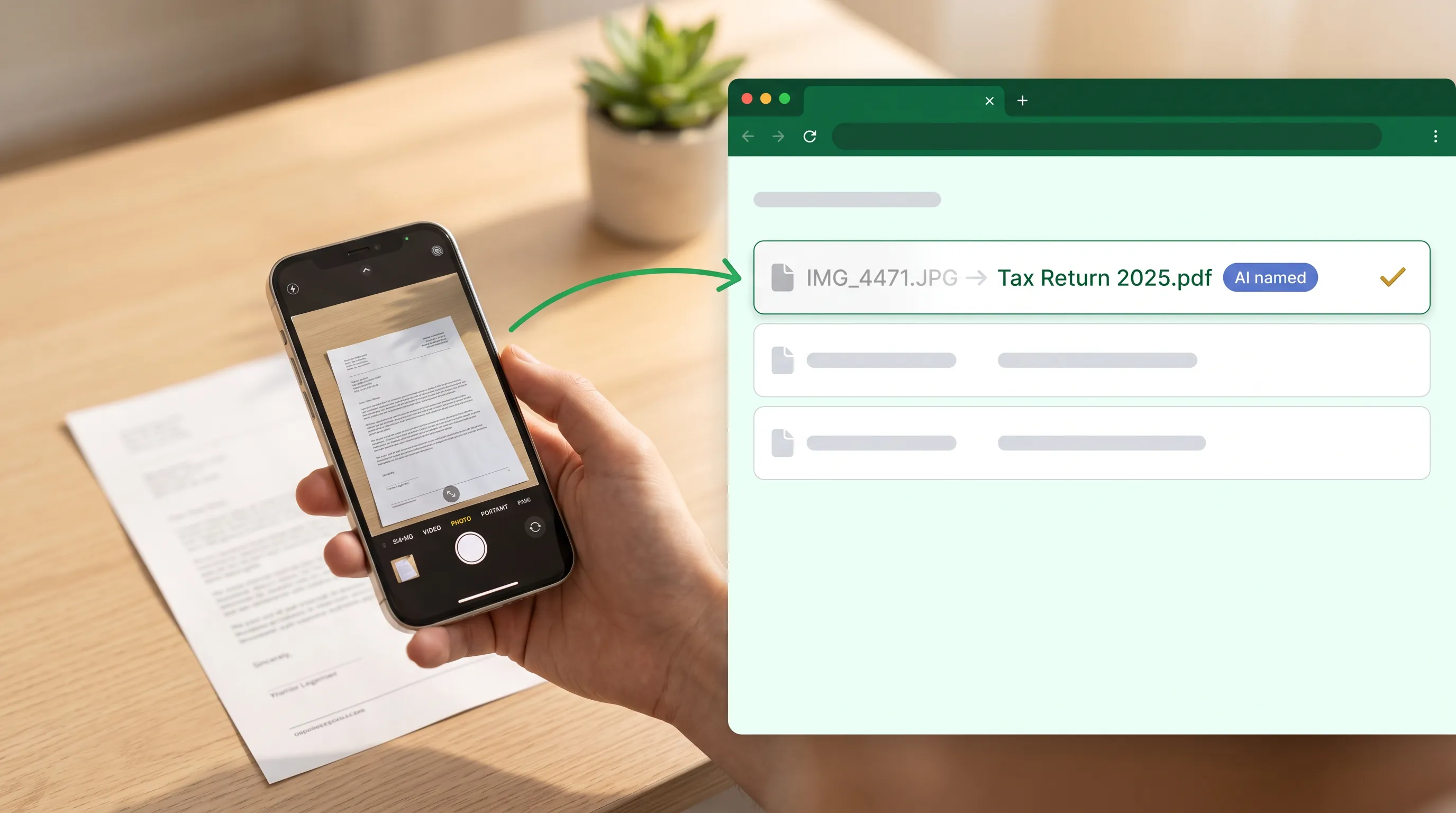
    Most elderly clients do not own a scanner. If a portal cannot accept a photograph of a document, and name it something more useful than IMG_4471, the firm ends up renaming files by hand.

  4. One screen with one obvious thing to do.

    A folder tree is a firm-side convenience. The client’s view should show what is being asked of them and nothing else.

  5. A way for the firm to see where the client got stuck.

    When a client says “I did send it,” somebody has to be able to check. Access and upload history turns a support call into a five-second answer.

Card listing the five things that make a portal usable for an older client: no password, no app, phone camera as scanner, one screen with one action, and visible access history

How Zapa handles each one

What the client facesHow Zapa handles it
Signing inA link in the email signs them in. No password to create, remember, or reset. If they do want a password, they have a seven-day grace period to set one rather than being forced to at first contact.
Installing somethingNothing to install. The portal opens in the browser on a phone, tablet, or computer.
Sending a document with no scannerThey photograph it with the phone camera. Zapa reads the document and names the file, so what arrives in your portal is labeled, not IMG_4471.A phone photographing a paper form, with the portal renaming the upload from IMG_4471.JPG to Tax Return 2025.pdf
Knowing what to doThe first time a client opens a vault, the portal tells them what the firm is asking for and gives them one action to take.
Getting chasedYou send a file request once and Zapa sends the reminders for you, on a schedule, until the documents arrive.
Signing a documentYou can send a fillable PDF for them to complete and sign. On the Large Firm plan you can also open a video call, put the document on the screen, and have them fill it in and sign while you talk them through it.
Proving they sent itEvery upload, download, and sign-in is recorded in a one-click history.
Paying for itClients never pay anything, and there are no per-seat fees for your team either.

The evidence

Estate, trust, and fiduciary practices have the least technical client base of any group Zapa serves, and they are the group that converts best.

~80%
of estate-practice signups become paying firms — the segment whose clients are most often in their seventies and eighties.
1M+
client files exchanged through Zapa portals across the firms using them.

What to say to a client who has already refused

The mistake most firms make is explaining the portal. Do not explain it. Ask for one thing and let the portal do the rest.

Subject: One document, one click

Hi [name] — I need a copy of [document]. I have sent it as a request through our secure portal, so you will get a separate email from us with a button in it. Click the button and it will open straight to the page. There is no password and nothing to download. If the document is on paper, just take a photo of it with your phone and send that — it does not need to be a scan.

If anything at all does not work, call me and I will stay on the phone with you while we do it together.

Two things make this work. The client is asked for one document, not introduced to a system. And the offer to stay on the phone is almost never taken up, but it removes the fear of being stranded, which is the actual reason people do not click.

When another tool is the better answer

  • If a client has no email address at all, no portal solves this. Zapa needs an email address to send the sign-in link to. A client without one still needs paper, a phone call, or a visit, and any vendor who tells you otherwise is selling you something.

  • If you want the portal to be part of full practice management — billing, jobs, pipelines, time tracking — TaxDome, Canopy, or Karbon are the category to look at. Zapa is the client-facing layer, not a practice-management system. See Zapa vs. TaxDome.

  • If your workflow lives inside Intuit tax software, SmartVault’s Lacerte, ProConnect, ProSeries, and UltraTax integrations are deeper than anything Zapa offers. See Zapa vs. SmartVault.

  • If your practice-management suite already bundles a portal and your clients use it, keep it. The reason to change is that documents are not arriving, not that a different portal exists.

Security, because the easy option is the insecure one

The reason this matters is that the fallback is always email. When a portal defeats a client, the documents come back as an email attachment, and a plain email attachment is not encrypted in transit — which is the thing the FTC Safeguards Rule requires of tax, accounting, and fiduciary practices.

Files in Zapa are encrypted in transit and at rest, access is controlled per portal and per person, and every action is recorded in an audit history. The platform runs on AWS.

If you are writing or updating the plan that has to describe all of this, download the free WISP template for tax and accounting firms — fillable, and checked against IRS Publication 5708 and 16 CFR Part 314.

Getting started

Most firms create their first portal, invite a client, and share files in under five minutes, and launch the same afternoon. There is no IT project and no migration to schedule.

Professional

$175/month

Or $140/month billed annually.

Large Firm

$350/month

Or $280/month billed annually. Adds built-in video chat with recording and screen share, so you can walk a client through a document and capture the signature live.

Enterprise

Custom

With REST API and webhook access.

Every plan includes unlimited team members, unlimited client accounts, unlimited portals, and your firm’s branding. The price does not change as your firm grows. There is a 30-day free trial and no contract.

Frequently asked questions

What is the best client portal for elderly clients?

The one your elderly clients can finish a task in without calling you. In practice that means no password to create, nothing to install, and the ability to send a photograph of a document instead of a scan. Zapa Client Portals is built around those three things: clients sign in from a link in an email, the portal opens in their existing browser, and a phone photo is a valid way to send a document.

Can an 80-year-old client really use a client portal?

Yes, if the portal does not make them create an account. Zapa’s most successful segment is estate, trust, and fiduciary practices, whose clients are frequently in their seventies and eighties, and about 80% of those signups become paying firms. Firms have moved over a million client files through Zapa portals.

Is there a client portal designed for elderly clients?

Zapa Client Portals is built for exactly that case. The design decisions that matter for an elderly client are sign-in by emailed link with no password, no app to install, and the ability to photograph a document instead of scanning it. Most portals are designed around the firm’s document workflow and treat the client’s side as an afterthought, which is why the documents stop arriving.

Do my clients need a password?

No. A Zapa client signs in from a link in the email they were sent. If they prefer to set a password they can, and they have a seven-day grace period to do it rather than being forced to at first contact.

Do my clients have to download an app?

No. The portal runs in whatever browser is already on their phone, tablet, or computer. There is no app store and no installation.

What if my client can only take a photo of a document?

That is a supported way to send a document. The client photographs it with their phone and uploads it, and Zapa names the file based on what the document is, so your portal does not fill up with files called IMG_4471.

Do my clients have to pay anything?

No. Client accounts are free and unlimited. Your firm’s plan also includes unlimited team members with no per-seat fees.

What happens when a client gets stuck?

Every sign-in, upload, and download is recorded in a one-click history, so you can see exactly how far a client got instead of guessing. Automatic reminders keep chasing the request without you having to.

Can I get a document signed without the client printing it?

Yes. You can send a fillable PDF for them to complete and sign in the portal. On the Large Firm plan you can also open a video call, put the document on the screen, and have the client fill it in and sign while you walk them through it.

How long does setup take?

Under five minutes to create your first portal, invite a client, and share files. Most firms are fully running the same afternoon, with no IT support.

Is a portal actually more secure than emailing an attachment?

Yes, and for tax, accounting, and fiduciary practices it is the difference between meeting the FTC Safeguards Rule and not. A plain email attachment is not encrypted in transit. Files in Zapa are encrypted in transit and at rest, access is controlled per portal and per person, and every action is logged.

See What Our Clients Say About the Client Portal

Our secure file-sharing services are transforming real people and businesses, but don't take our word for it. See what our happy clients have today.

Stouffer Legal

"Zapa saved us from the complicated portals and unclear user invitations of our prior solution. It's been a major impact to our operational efficiency saving time sending files to our clients. We've also seen a major drop in support calls from our clients asking how to upload a file or download their documents. Highly recommend!"

Revive Orofacial Therapy and Wellness Center

I had been searching for a way to send large files back and forth to my patients and staff, with no size limitations, for a reasonable monthly/yearly price, that was ALSO HIPPA compliant. Needless to say, there were not many options that fit the bill. Then I came upon Zapa Portals and the clouds parted and the angels started to sing! I had found exactly what I was looking for! Zapa Portals checked all of my boxes and then some! The interface is simple and easy to navigate. The storage capabilities are awesome and I love that you can access/view your documents and videos within the portal WITHOUT having to download them and take up space on your own device

Jessica B.

Clients are able to upload personal files, download files, sign and reupload authorizations. The ability to set permissions for each end user is very important and easy. Clients enjoy the ability to have tasks (electronic To-Do list) and to close them as they complete them.

Lilliana A.

I use ZAPA Portal everyday. As a paralegal, it is critical that we have a software to securely share sensitive documents with our clients and third parties. This software allows me to drag and drop, upload with ease, large attachments. The security of this site protects our clients and gives everyone peace of mind. It is also very user friendly, so clients can easily learn to use this software. I would recommend ZAPA Portal to any business looking for a reliable software to share and store files.

Michelle B.

Excellent secure portal.

Morgan B.

Zapa is very user-friendly. Individuals of all ages find this software very safe and secure to use to upload documents such as legal ones.

Zapa- illustration Dotted Circles